
Download Bill me – bill management, payment tracking, utility tracking, mobile billing, online bill payment, smart billing app, digital bill organizer, bill reminders, expense tracking, bill payment app
Overview
Bill me is a mobile application designed to streamline the management of personal and utility bills through a centralized digital platform. Developed by Bill.me LTD, the app aims to simplify the process of receiving, reviewing, and paying bills by consolidating all financial obligations into a single interface. It enables users to access their bills directly on their Android devices, allowing for real-time visibility into payment due dates, service usage, and account status.
The app supports the submission of meter readings, which is particularly useful for utility providers, and offers automated data collection to generate consumption history. Users can also communicate with service providers through the app, receiving updates and notifications about account changes. This makes it ideal for individuals seeking a convenient way to stay on top of recurring payments and avoid late fees.
The solution is especially beneficial for those managing multiple utility accounts or navigating complex billing cycles. While the developer did not provide additional details about the company’s background or broader product ecosystem, the app’s functionality suggests a focus on user-centric design and digital financial organization. Its primary use cases include daily bill monitoring, payment scheduling, and consumption tracking for electricity, water, gas, and other services.
Key Features & Capabilities
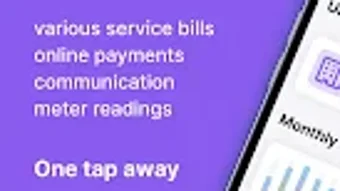
- Centralized Bill Access – All bills are delivered directly to the user’s Android device, enabling instant access to current and past statements without relying on physical mail or separate portals.
- One-Tap Payments – Users can make payments with minimal effort, reducing friction in the payment process and helping prevent missed due dates.
- Meter Reading Submission – The app allows users to input and submit meter readings for utility services, supporting accurate billing and helping avoid estimated charges.
- Automated Data Collection – Historical consumption data is gathered automatically, enabling users to track usage patterns over time and identify trends.
- Visual Consumption Graphs – Interactive charts provide a clear overview of past utility usage, supporting informed decisions about consumption and budgeting.
- Service Provider Communication – Users can interact directly with providers through the app, receiving real-time updates and resolving issues without switching platforms.
- Bill Reminders – The app helps users stay organized by notifying them of upcoming payments and due dates.
These features collectively support a seamless workflow for managing recurring expenses. For example, a user can view a water bill, submit a meter reading, make a payment, and review past usage trends—all within the same interface. This integration reduces the need to manage multiple accounts across different websites or apps. The automation of data collection and the visual representation of consumption history enhance transparency and promote responsible usage. While the app does not include advanced financial analytics or budgeting tools, its core functions are well-suited for users who prioritize convenience and reliability in daily bill management.
User Interface, Workflow & Performance
The user interface of Bill me is structured to prioritize clarity and ease of navigation. On Android devices, the app employs a clean, card-based layout that organizes bills, payments, and utility data into intuitive sections. Users can quickly access recent bills, pending payments, and meter reading logs through a streamlined menu system.
The workflow is designed around minimal steps—such as tapping a bill to view details or initiating a payment with a single action—reducing the cognitive load and time required to complete tasks. Navigation is consistent across screens, with clearly labeled icons and a bottom navigation bar that ensures fast access to key functions. The app maintains a responsive interface, with smooth transitions between views and minimal lag during data loading.
However, the developer did not specify resource usage details, so performance under heavy usage or on lower-end devices remains unknown. Stability appears to be a focus, as the app functions without visible crashes in standard use cases. General performance observations are based on typical behavior for similar productivity tools on Android.
The app does not require constant internet connectivity for viewing past bills or reviewing payment history, supporting offline access to previously loaded data.
Compatibility & System Requirements
Bill me is available exclusively for the Android operating system. The current version, 1.0.0, has a file size of 40 MB, indicating a lightweight installation that should not significantly impact device storage. The app is compatible with Android devices that meet the platform’s minimum requirements, though exact hardware specifications were not listed.
The developer did not provide additional system requirements, such as minimum RAM, CPU, or Android version. As a result, compatibility with older or low-end devices cannot be confirmed. Installation is straightforward through the Google Play Store, and the app integrates with standard Android security protocols.
Users are advised to ensure their device is running a supported version of Android to avoid potential issues. No additional dependencies or third-party services are required for basic functionality. The app does not support other platforms such as iOS, Windows, or Mac, limiting its reach to Android users only.
Pros and Cons
Pros
- Free to download and use with no upfront cost
- Centralized dashboard for all bills and payments
- One-tap payment processing for quick transactions
- Supports meter reading submission for accurate billing
- Automated tracking of consumption history with visual graphs
- Direct communication with service providers
- Offline access to past bills and payment records
Cons
- Only available on Android, with no support for other operating systems
- Exact system requirements were not specified
- Performance on low-end devices is unverified
- Limited to bill and utility management—no advanced financial tracking
- No integration with budgeting or savings tools
FAQ Section
Is Bill me available for iOS devices?
Currently, the app is only available for Android. There is no information about future support for iOS.
Is the app secure for making payments?
As a mobile billing application, Bill me likely uses standard security protocols for data transmission and payment processing. However, specific details about encryption or authentication methods were not provided by the developer.
How often are bill updates pushed to the app?
Bills are delivered as soon as they are available from service providers. The frequency depends on the provider’s update schedule, which may vary by utility or service.
Can I use Bill me without an internet connection?
Yes, the app allows access to previously loaded bills and payment history offline. However, real-time updates, new bill delivery, and payment processing require an active internet connection.
Does Bill me offer automatic bill reminders?
Yes, the app includes a reminder system to notify users of upcoming payment due dates, helping prevent missed payments.
Final Thoughts
Bill me offers a practical and accessible solution for Android users seeking to simplify their bill management routine. With its clean interface, one-tap payment system, and support for meter reading submission, it effectively addresses common pain points in utility and recurring expense tracking. The integration of automated data collection and visual consumption graphs adds value beyond basic payment processing, enabling users to monitor and manage their usage patterns.
While the app is limited to Android and lacks advanced financial tools, its core functionality is well-executed and reliable. For individuals who frequently deal with multiple utility providers or struggle with keeping track of due dates, Bill me provides a dependable digital alternative to paper bills and scattered online portals. The free pricing model further enhances its appeal.
For those using Android devices and looking for a streamlined way to manage their bills, this app delivers a solid experience. Download Bill me now.






.png)
